Stonex STX-GRADE · Dozers & graders
Your best operator’s
finish. From
every operator.

Dozers & graders
Dual-antenna SMC-TWO
Blade-mounted sensors
Indicate — not auto blade

Why grade control
On a dozer, the saving
is passes
On an excavator, machine control mostly stops you digging too deep. On a dozer the arithmetic is different. The blade is going over the ground either way — the question is how many times, and whether the last pass was necessary.
Without guidance, an operator works to stakes and to feel. They take a conservative cut because too much is worse than too little, then come back over it. A good operator does this efficiently. A newer one does it three or four times, and nobody can tell them they were wrong until a surveyor turns up.
With cut and fill drawn against the design in real time, the pass either takes material off or it doesn’t. That’s fewer passes, less fuel, less track wear, and — the part that actually shows up in the numbers — a finish that doesn’t depend on which operator was rostered on.
Indicate vs auto
The operator still
works the blade
Guidance, not
hydraulic control
STX-GRADE shows the operator continuously where the blade sits against the design. It does not drive the hydraulics and move the blade for them. That’s a real difference and it’s worth being blunt about it.
- What you get — live cut and fill against the design, blade position from sensors mounted on the blade itself, and a consistent finish across operators
- What you don’t get — the blade moving itself to hold grade
- What auto would need — a PWM hydraulic valve already fitted to your machine. Stonex don’t supply hydraulic components, so that’s on the machine or it isn’t happening
- Stonex have an AUTO version in development, laser-sensor based. It isn’t available today and we won’t sell you a maybe
- Who indicate suits — contractors whose operators can hold a grade once they can see it, and whose real problem is knowing where grade is
- Who it doesn’t — anyone whose business case depends on an inexperienced operator matching an experienced one without touching the levers
What’s in it
Fewer parts than
you’d expect
SMC-TWO GNSS
Blade-mounted
In-cab touchscreen
STX-MC platform
NTRIP or UHF
Dozers and graders
Four per display
Grade to the model
See it working
What the operator
is actually reading
Fitting it
A demo in an afternoon.
A proper fit in a day.
Scope
Mount
Connect
Calibrate
Validate & train
Cost & fleet
One display can
cover four machines
Fit the sensors once,
move the expensive part
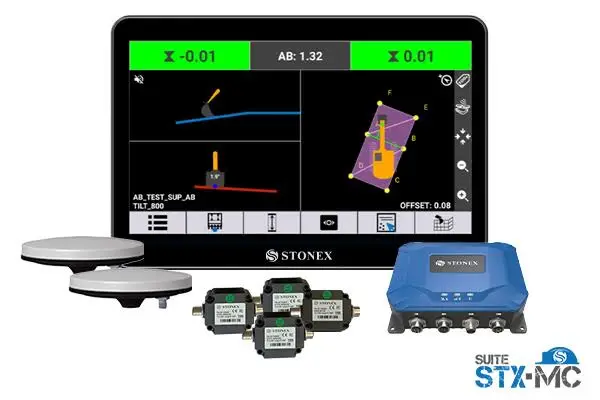
The sensors stay fitted and calibrated to their machine. The display and antennas can move, with up to four machine profiles saved. On a fleet where not every dozer runs every day, that’s a genuinely different sum from one full system per machine.
- Sensor sets on each machine, one display and antenna set moved between them
- Staged rollout — two machines for a quarter, then decide about the rest on your own numbers
- Flexible payment terms arranged around project cycles rather than a fixed schedule
- Rent-to-purchase for project work, so a single job can carry the cost
- Trade-in off older equipment, and volume pricing across multiple machines
Common questions
Before you call
No. STX-GRADE is indicate — it shows the operator where the blade is against the design and they work it from there. Stonex have an automatic version in development based on laser sensors, but it isn’t available today, and automatic control would also require a PWM hydraulic valve already fitted to your machine since Stonex don’t supply hydraulic components.
It follows the correction source — an RTK-corrected system is generally in the ±2cm range on final grade, which is where most civil and mining earthworks tolerances sit. Sub-centimetre isn’t available on this system today; Stonex have a laser-sensor version in development for work that genuinely needs it. If your specification calls for sub-centimetre, tell us at the start.
No. Unlike the 2D excavator system, STX-GRADE depends on GNSS, so under a roof or in a genuinely signal-blocked environment it won’t function. Stonex are working on a laser-based solution for exactly this. On open sites it’s a matter of sorting the base or network properly at the scoping stage rather than assuming coverage.
Partly, and this is the useful bit for a fleet. Up to four machine profiles save on one display, and the display and GNSS antennas move between machines. The sensors have to stay fixed to their machine and stay calibrated — moving those defeats the purpose and you’d be recalibrating every time.
A quick demonstration install is two to four hours. A full professional setup runs up to a working day, six to eight hours, and most of that is doing the calibration properly rather than the mounting. We work around shutdowns, weekends or a staged fleet rollout.
Almost certainly. The system is modular and scalable across any type or size of dozer, including skid dozers, and the same platform covers graders. Send us the make, model and year and we’ll confirm before you commit to anything — including telling you if a particular machine is going to be awkward.
Tell us about